Your product feed is the foundation of your organic shopping presence
Fill out as much info as you can, and make sure to use keywords and relevant details (colour, size, etc) in titles and descriptions
Back this up with structured data, well-optimised product pages and a smooth buying journey
When it comes to product listings, many ecommerce businesses focus their energy on paid Shopping ads, but there’s a whole other piece of completely free SERP real estate that they can benefit from… Organic Shopping. And with paid acquisition costs rising (along with competition), why pay for clicks that you can get for free?
True, the paid ads take up the prime top spot on the page (naturally), but that doesn’t change the fact that there is a very prominent section of the results page that your products can appear in, and you don’t need to pay a penny. And it’s not just Search either, free product listings can appear in image search, the Shopping tab and even on YouTube.
So, how do you get your products to appear in these spaces? Well, like everything search-related, it’s a question of optimisation. In this case, mainly your shopping feed, but your website plays a role too.
Here, we’ll show you how you can optimise your product feed and product pages to give your business its best chance of appearing in organic shopping listings, and of reaping all the benefits that brings.
Let’s get started.
What Is Organic Shopping?
Organic Shopping is a chance for retailers to showcase their products to potential buyers free of charge, with visually rich product listings that can appear on Google, Bing and other search engines. For the purposes of this post, we’ll generally reference Google, but the principle is the same across the board.
The general appearance of these listings is similar to paid Shopping ads, with an image of your product, your store name, your product name, brand, price, sale price (if applicable) and star rating. However, paid ads will carry a “Sponsored products” label, while organic listings do not.
Organic listings
Paid listings
You may also see other attributes such as location info, delivery info, discounts and energy ratings, depending on the product and whether you have physical stores.
These listings give buyers the opportunity to compare products and product information right there in the search results, and if your product looks compelling enough, there’s a good chance they’ll click through to your store.
Where can I see organic shopping listings?
You can now see organic listings across various Google platforms, including Search, the Shopping tab, Images, YouTube and even Maps. With Google Lens, you can also search for products by snapping an image or taking a screenshot.
How Does Organic Shopping Work?
Organic shopping is driven by your product feed. This is essentially a master list of all your products and product information (price, sale price, SKU, size, quantity, colour, etc…). To enable your products to appear in organic shopping listings, you simply submit this feed in Google’s Merchant Center (usually written with the US spelling) and, as long as your information and images are accurate and high quality, you will be able to appear.
Of course, just doing this is not a guarantee that you will appear, as there are lots of other factors at play (which we’ll go into shortly), but the important thing is that you can appear.
How Google Views Your Products
Many brands, if not actively investing in paid shopping, will either not have a feed or will have a feed that’s been left to its own devices. In this case, it can lead to broken links, outdated pricing and missing images and attributes, all of which will stop your listings from appearing.
Google will only view your product based on the information you provide, which is why it’s important to get it right. And what’s more, Google needs to be able to trust that information before it shows your products to buyers. Your product feed acts as a bridge, instantly connecting your actual website inventory with what searchers see on their screens.
When a user searches for a specific item, Google doesn’t just read your page. It checks your feed to verify that the item is in stock, the price is correct and the image is accurate. If your website says one thing and your feed says another, Google loses confidence in your brand.
As such, a clean, optimised feed, submitted to Merchant Center, is crucial, backed up by comprehensive structured data and compelling product pages. Structured data on its own is not enough, nor is optimising your product pages for keywords and conversions. Success in Google Shopping depends on a combination of all three things.
Whichever format you choose, you will need to create a Merchant Center account and submit your feed. We would always recommend a feed that updates and syncs automatically as much as possible to cut down on manual input.
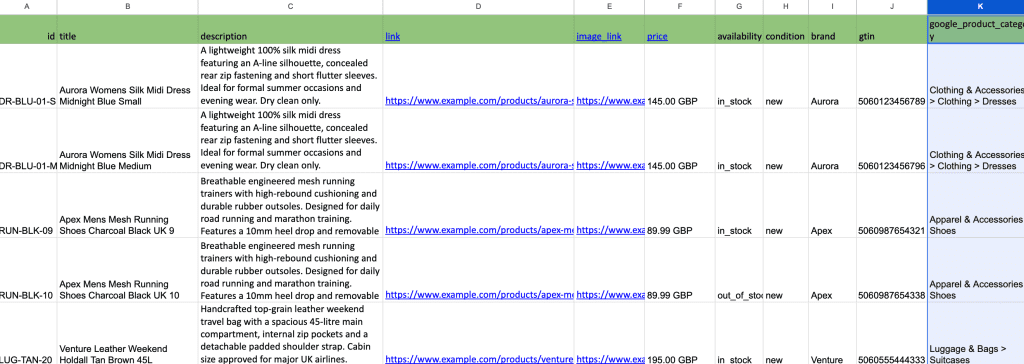
Let’s say you use Google Sheets to create a feed. You’ll create a template like this:
You need to populate the columns with the following mandatory fields:
id: a unique identifier for the specific product (e.g., SKU123)
title: the product’s name
description: an accurate overview of the product’s features and benefits
link: the direct URL to your product landing page
image_link: the URL of the main product image (make sure it’s high definition)
price: the cost of the product, formatted with the local currency (e.g., 15.99 GBP)
availability: the stock status (e.g., in stock, out of stock, preorder)
condition: the state of the product (e.g., new, used, refurbished)
brand: the name of the product’s manufacturer
Then add your product info to the relevant field.
Once you’ve filled out your information, simply upload your feed to Merchant Center and you’re done!
Note:
Unless you’ve got an automated feed that updates whenever your products do, you will need to remember to update product information(e.g. price changes, discounts) yourself.
Optimising Your Shopping Feed Data
Aside from creating and populating your shopping feed, the single most important step is optimising your feed data and making sure you have as much information and as many fields populated as you can. The more info you can give Google about your products, the more it has to work with, and the better your chances of appearing in organic listings.
Creating high-performing product titles
Arguably the most important element of your feed. Your product titles should be focused on what the product is, the brand and its key features (e.g. size, colour, material, style, etc).
Avoid any internal product names or jargon – this is not the place to be creative. Think about what your buyers will actually be searching for and include those keywords in your titles.
Tip:
Put the most important search terms toward the front of your title (brand, product type) as Google will truncate titles on smaller screens
Writing descriptions that convert
The product description needs to be the place where questions are answered and problems solved. As with your titles, avoid jargon. Focus on secondary keywords and clearly describe the benefits and features of the product.
For example, if you’re selling, say, a blue dress, don’t just describe it as “elegant” or “sophisticated”. Instead, describe fastenings, cut, fabric pattern, sleeve lengths, embellishments, occasions that it might be suitable for, skirt length, sizing, fit and washing instructions.
Product categories & attributes
Map your product to the most specific Google Product Category (GPC) possible, rather than staying at the top level. Sticking with our blue dress example…
Poor categorisation:
Clothing & Accessories
Optimised categorisation:
Clothing & Accessories > Clothing > Dresses
When it comes to product attributes (colour, size, material, gender, age group, shipping weight, sale price…), more is definitely better. Basically, provide as much info as you possibly can, ensuring it’s up to date and accurate. Even if the field is optional, if you have the information to hand, get it in!
High-impact product images
While your product titles are probably the most important factor for search engines when it comes to showing your listings, your images (and prices, to be fair!) are what will get users to click.
So, make sure your images are as high-quality as they can be and offer alternative images as well if you can (Google and Microsoft let you add up to 10 additional image URLs alongside your primary image). Use images that just show the product, with no promotional text or watermarks, and ensure they accurately display the product.
Ensure Your Website Delivers Too!
Optimising for organic shopping doesn’t end with your shopping feed. Your website also plays a key role. Fast-loading pages, compelling copy, high-quality images, clear calls to action and a seamless buying journey are all vital to sales success.
If your Shopping listings are let down by a poor user experience once visitors get to your site, they’re going to click straight back to the search results and go somewhere else.
The importance of product schema
Product schema (also known as structured data) is information you can add to various elements of your website (in the code – so you may need a developer’s help here) that makes it easier for search engines and AI engines to understand and contextualise.
Google cross-references the data from your feed with this structured data, and if it finds any discrepancies, it can prevent your products being shown, so it’s important that everything is aligned.
Well-optimised product pages
Your product pages are that final push over the line. The visitor is interested enough in your product to have clicked through, now they just need to hit that “BUY” button. You want to remove any doubt that they need this product, and they need it now.
That means making sure that your product pages really sell the benefits of the product and how it answers the user’s need. Include the following:
Comprehensive product descriptions, using relevant keywords and highlighting benefits & key features
Clear pricing, with no ambiguities
Stock information/warnings (only 2 left!)
Clear presentation of product variants, for example, dropdowns for size, colour, quantity, etc.
Prominent and easy-to-find “Buy” or “Add to basket” button
High-definition images (and, if possible, video of your product in use) and zoom functionality
Product dimensions and/or specifications (ideally presented in an easy-to-read table format)
Related products to maximise upsell and cross-sell opportunities
FAQs – great for AI search, but also very useful to potential customers. Bonus points if you can include actual questions from sales calls.
More product page tips:
Updating product variants should not reload the page.
Make sure you optimise your images – use keywords in image titles and write descriptive ALT text for each one.
Don’t just use manufacturer product descriptions. Craft your own versions focusing on how the product solves buyers’ issues and why they need it … now!
Your website as a whole
An excellent user experience should extend across your whole website in order to build and maintain trust with your visitors. That means:
mobile-first design
fast-loading pages (under 2 seconds is best)
clear contact details and support information (preferably giving the user various options for getting in touch)
USP bar – free delivery? UK-made? Top rated? Financing available? Showcase these highlights in a static banner at the top of your site
showcasing customer reviews
bulk order options (if applicable)
sitewide footer links to delivery and returns info
accreditation & awards logos (e.g. if you’re a member of a relevant trade body or organisation)
payment platform logos
simple, clear and accessible contact forms throughout
Shopping Feed Optimisation Boosts Revenue for Boston Seeds
Find out how feed optimisation & strategic SEO increased our client’s YoY revenue by over 400%
As with any of your marketing channels, you’ll need to track the performance of your products in your organic listings. Without proper monitoring, you won’t know when or where you need to make improvements and you won’t be able to identify your best- (or worst-) performing products.
Fortunately, there are several ways you can track your Shopping listings’ performance:
Google Analytics (GA4)
Track traffic to your website, revenue, transactions and product performance. If you connect your Merchant Center to your GA4 account, you’ll also be able to compare the performance of your organic listings against that of your paid ones, so you can see where you might be wasting money on clicks.
Tip:
Enable Automatic Tagging in Merchant Center. Many retailers assume they can add utm parameters to their URLs to track performance in GA4. The problem is that this carries over to paid searchas well, and interferes with the tracking that’s already in place there, likely leading to incorrect attribution. By enabling Automatic Tagging, Google will automatically attach the correct tracking based on channel, and you’ll be able to view this data in your GA4 reports.
Google Search Console
Search Console lets you see how often your products are appearing in the listings grid and for which keywords. You can also see which ones are driving the most clicks and which ones might need a bit of a boost to get that traffic.
Tip:
Use filters to isolate your Shopping listings performance for reporting
Google Merchant Center
Get powerful insights into product performance and any potential feed issues. You can track clicks, impressions and feed errors down to product level.
Next Steps
If you don’t have a shopping feed, create one and submit in Merchant Center
If you do have a feed, audit your product data. Are you providing as much information as you can? Are all the relevant and necessary fields populated? Is the information accurate and up to date?
Fix your product titles – start with say, your top 10 performing products and optimise using the method above
Monitor results – leave optimisations in place for 2-3 weeks and assess the impact. Roll out changes across other products or re-optimise as needed.
Get Found in Organic Shopping
We help ecommerce businesses just like yours get their products found by the people who need them, right where they’re searching. Speak to our SEO team about optimising your product feed today!
I’ve been working in digital marketing for over a decade now, both agency-side and in-house. Over the years, I’ve managed the SEO, PPC, email and affiliate campaigns for a major UK retailer, and the SEO, CRO and ongoing website updates for a well-known ISP. Agency side, I have run successful SEO and email campaigns for large high-street retailers, as well as for smaller local businesses. It’s fair to say that I have a broad range of experience in marketing, but SEO is where my heart truly lies!