When running a Google Ads account, it can be tempting to make changes left, right, and centre. However, you’ll only see real growth if you make strategic refinements, not random tweaks. Whether you want to lower your Cost Per Acquisition (CPA), improve your Quality Score, or make the switch from standard Shopping to Performance Max (PMAX), knowing which changes will have the biggest impact is crucial.
In this guide, we break down our top 10 high-impact Google Ads optimisations, from advanced bid strategies to location targeting, all designed to eliminate wasted spend and maximise your ROI.
1. Adjust your bid strategy
The single most impactful optimisation you can make on Google Ads is bid strategy testing.
Particularly switching from manual CPC or maximise clicks to maximise conversions or maximise conversion value. Rather than staying manual or prioritising clicks over conversions, switching the bid strategy to target for more conversions often results in an uplift in leads/ sales (depending on what the objectives are).
How to do this:
In your campaignsoverview, hover over the campaign you want to edit and click on the little cog that appears.
In the menu that appears, click on Biddingunder Budget and bidding optimisation
Select your preferred strategy from the options available
Pro tip: Adding a Target CPA or a Target ROAS can improve the efficiency even further. If the actual CPA is £50, test a Target CPA -10% and see if it will reduce to £45. If you do that every couple of weeks, you can keep reducing your CPA.
2. Review search terms and add negative keywords
Keyword match types are becoming increasingly broad. Even exact match can show for a wide array of search terms. This unfortunately means that you can easily waste spend on irrelevant search terms or queries that don’t match the theme of your ad group.
One of the highest-impact updates you can make to your Google Ads account is to comb through the search query reports and use negative keywords to filter out any search terms that are wasting spend and need to be excluded.
How to do this:
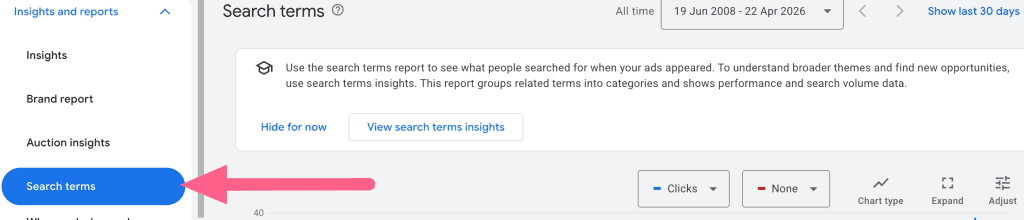
Under Insights and reports in the left-hand menu, click on Search terms
Review the list
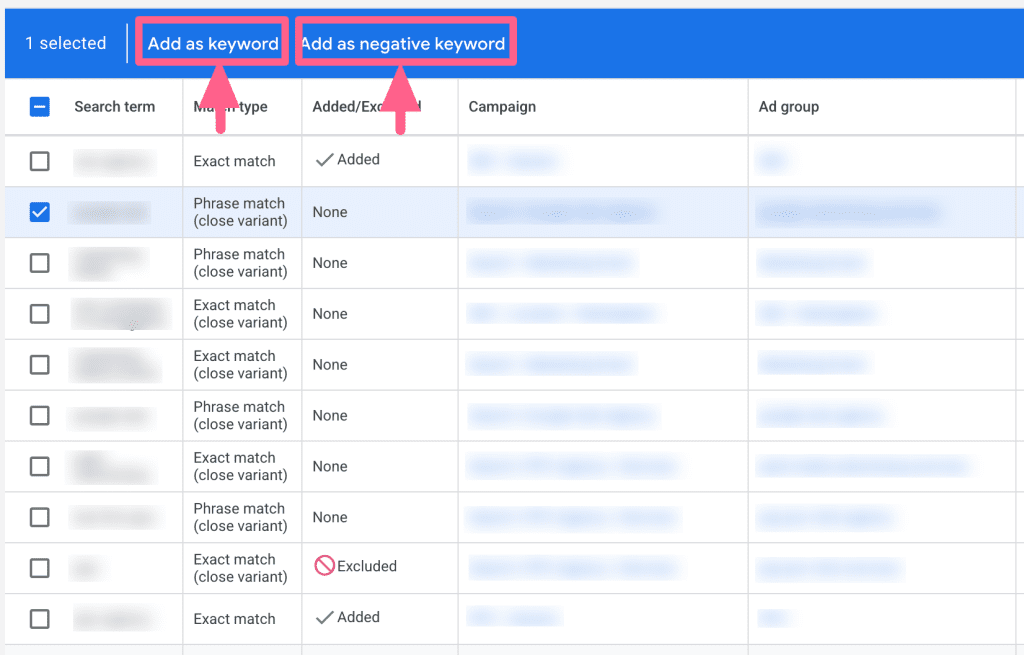
Select any keywords you want to add to your campaigns or exclude and choose from the two options in the blue box that appears
3. Optimise ad copy, headlines & descriptions
Google has made it harder in recent years to optimise ad copy – since Responsive Search Ads were launched, a lot of it is now automated. What I would suggest is reviewing your headline and descriptions and swapping out any that are not performing as they should be.
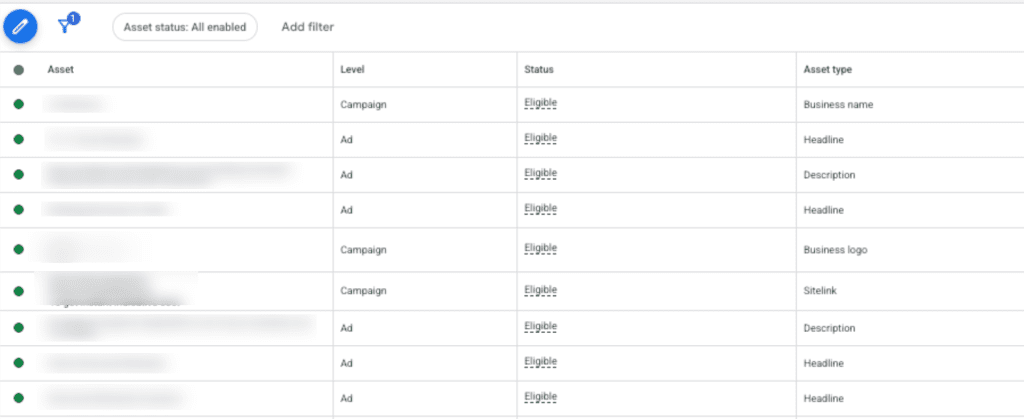
If you click “view asset details”, you can see all your headlines and descriptions and how they are performing, with important metrics such as click-through rate and conversion. I would target any that show as lower-than-average for these metrics and test new copy against them. By doing this, you can incrementally improve these key metrics.
How to do this:
In the Campaigns menu, click on Ads
Click on the View asset details link
You’ll see a list of your assets with all their performance metrics – review and take action as needed
4. Schedule your ads
For many advertisers, different days of the week and times of day can see vastly different results.
For example, many B2B accounts see much better performance 9-5, Monday to Friday, when their target audiences are at their computers.
You can review your day of the week and time of the day results if you go to Insights and Reports > Report Editor. If you’re seeing better performance on certain days or at certain times, you can tighten your ad scheduling to match these in the ad schedule section of the campaigns.
How to do this:
Navigate to Insights and reports > Report editor
Scroll down to the section headed When and where ads showed and click on the When your ads showed report
5. Improve Quality Score
Quality Score is still an important part of optimising paid search accounts. Low Quality Score can result in high cost per click, so improving it can make your keywords’ CPC lower. Quality Score is made up of three factors:
expected click-through rate
landing page experience
ad relevance.
Expected click-through rate – this can be improved with better quality and eye-catching ad copy and, ironically, higher bids.
Landing page experience – this is a measure of how much the content matches the user’s search query and demonstrates transparency & trust. Mobile-friendliness, ease of navigation and speed are also factors, so you need to make sure your pages are quick to load and that visitors can use and navigate them, no matter what device they are using.
Ad relevance – how much the ad copy relates to the user’s search query and to what extent it matches the content of the landing page. Ensure you’re using relevant keywords in your ads and that those keywords are also reflected in the content of your landing page.
Optimising for all of these should result in higher quality and lower CPC.
6. Enable remarketing
Enabling remarketing can be a quick win. If you’re not using it, you could be losing opportunities from visitors who don’t convert immediately and who then leave your page forever, never to return.
Remarketing to these users gives you a chance to target visitors who have already visited your page and who have therefore already shown an interest in your product or service. Also, it’s often quite cheap, especially when you use the Display Network.
How to do this:
This one’s a bit more complex, as you’ll need to use Tag Manager.
In your Google Ads account, click on Tools and then Shared library
Select Audience manager, and then Audience sources
Select the audience you wish to target
Follow the instructions to set up your tag
Pro tip: You’re targeting users who are already aware of your service or products, so don’t be afraid to be very direct in your messaging.
7. Switch from Shopping to Performance Max
A lot of ecommerce PPC accounts are still using standard shopping, and, in many cases, it can outperform Performance Max. But more often than not, PMax will outperform standard shopping because it leverages Google’s AI to access, automate and optimise across all of Google’s inventory.
You can display your ads on YouTube, Gmail, Search, Display & Maps rather than just the search engine results pages. You’re then reaching a wider user base, whether those users are actively searching or not.
You can either use Google experiments to A/B test between standard shopping and PMax or simply do a straight swap.
How to set up a PMax campaign:
Click on the + button and select Campaign
Choose your objective, add any goals and click Continue
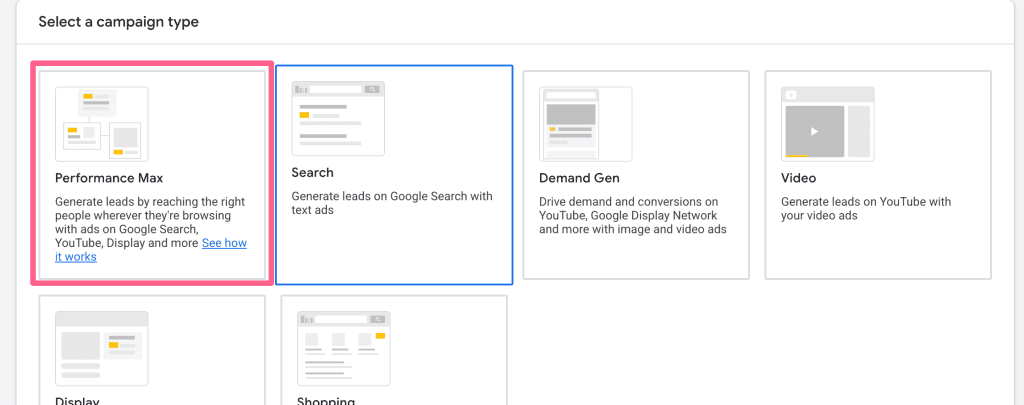
Select Performance Max as your campaign type
Add your landing page URL and campaign name and click Continue
Select your budget, bid strategy, location(s) and language(s)
Build up assets and create your ads
Publish your campaign
8. Create more relevant/specific landing pages
One very old-school optimisation that still works is tailoring your ad copy to specific ad group themes.
This can also help with improving your Quality Scores (see above). If you have very specific ad group themes and you’ve also tailored your ad copy to these themes, you can improve your conversion rate if you alsotailor your landing pages to each ad group theme.
You can get pretty granular with analysing performance metrics in your Google Ads account. One of the key elements you can look at is location performance.
Google Ads lets you view all your important metrics (clicks, cost, click-through rate (CTR), conversion rate, cost per conversion, revenue, etc.) by country. You can find this info under Insights and reports > When and where ads showed and selecting the Matched locations option above the table. This lets you review performance by a range of different criteria, including countries, municipalities, cities, postcodes, TV regions, boroughs, local areas and districts.
If any locations have a lot of clicks but aren’t converting, you can exclude them in the campaign location targeting. Alternatively, if some are performing really well, you can create location-specific campaigns for them.
10. Create top-keyword-specific campaigns
Our final high-impact change is reviewing your account-level keywords and seeing if there are any groups that are performing really well. If there are, try building out a new campaign specifically for those keywords.
This way, you can be more targeted with your ad spend and easily push more clicks/spend & conversions through your top-performing keywords.
How to do this:
Under Audiences, keywords and content in the left-hand menu, click on Keywords
Review the list of keywords and how they’re performing
Create new campaigns focused around high performers
Boost Your Google Ads Performance with Strategic Optimisations
Success in paid search isn’t about how many changes you make, but how much of an impact those changes have. From tightening your search terms with negative keywords to switching to the AI-driven power of Performance Max, our top ten impactful Google Ads tactics offer a roadmap for moving away from a scattergun approach and toward real, strategically driven growth.
By systematically testing these optimisations, rather than implementing them all at once, you can figure out what really works for your industry and audience. Start with changing your bid strategy and reviewing search terms to secure quick wins, then move into the longer-term optimisations like landing page relevance and Quality Score improvements.
By doing this, you’ll be able to stop wasting ad spend on what doesn’t work and start focusing on what does.
Want to Boost Your PPC Performance?
As an expert Google Ads management agency, we can help you put the above strategies into practice. Get started with a FREE account audit today.
Emlyn is a PPC Team Lead with over 7 years of experience in PPC. Having worked both in-house and agency-side, he brings a well-rounded understanding of what clients really need and how to deliver it. At The Digital Maze, he leads a talented PPC team, shaping strategy and driving performance across a wide range of clients. Based in Stoke-on-Trent, Emlyn is a father of three and a big sports fan, often watching football or basketball. He also enjoys gaming and reading when he gets the chance.